Open passwords and permission restrictions
A PDF can be locked in two different ways. An open password (also called a user password) is needed before anyone can see the document. Permission restrictions (set with an owner password) let the file open but block things like printing, copying text or editing.
Bank statements, payslips and tax documents often arrive with an open password, usually a date of birth or part of an account number described in the email. Typing it every time is tedious, and most PDF tools cannot merge, edit or compress a locked file. Removing the password once gives you a normal copy to work with.
Remove a PDF password step by step
- 1
Open Unlock PDF
Go to Unlock PDF in any browser, on a computer or a phone.
- 2
Choose the locked file
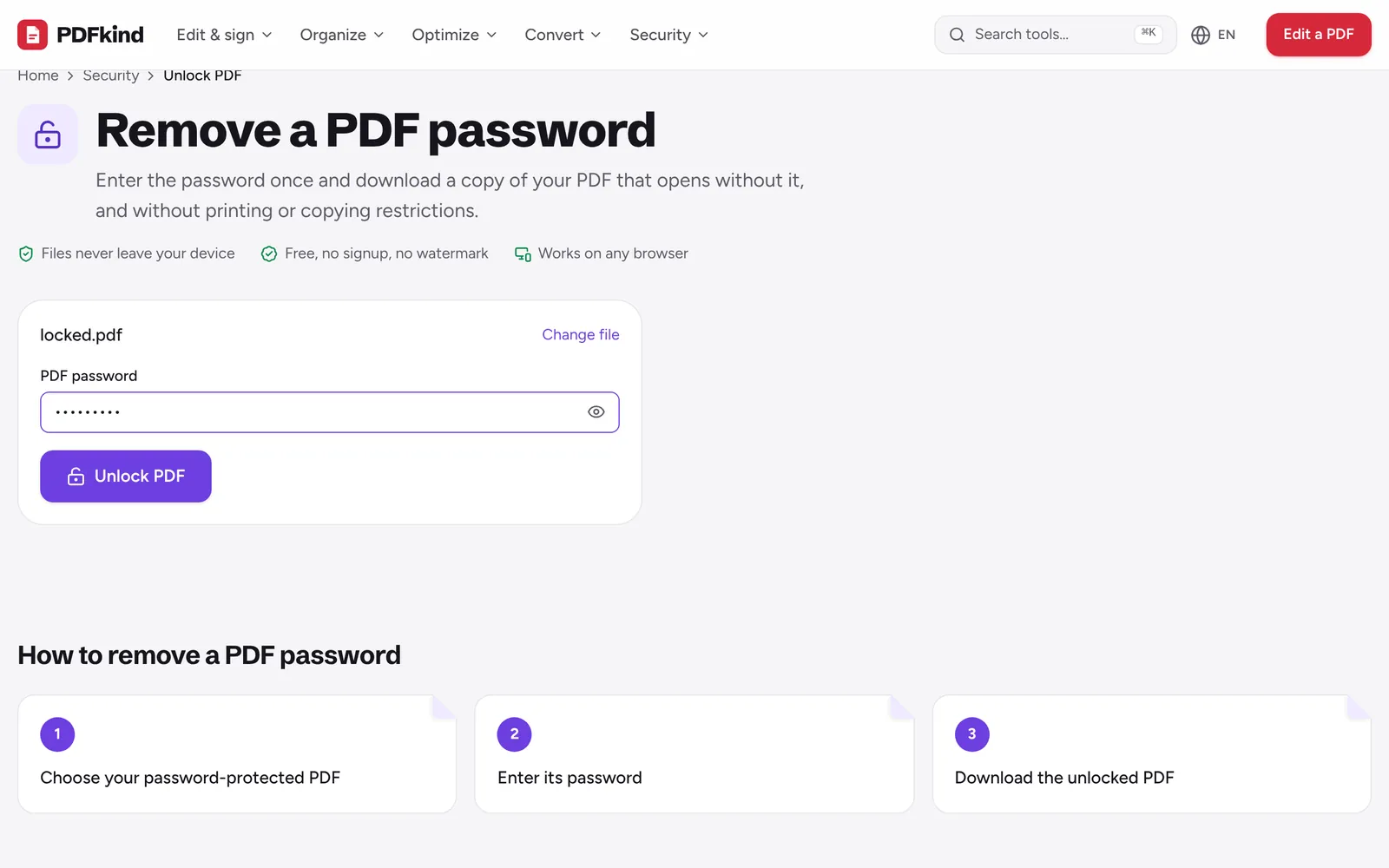
Click Choose a PDF or drop it here and select the protected PDF. The file is read on your device.
- 3
Type the password
Enter it in the PDF password field. Use the eye button to show what you typed if you are unsure about a character.
- 4
Unlock the file
Press Unlock PDF. If the password is wrong you will see Wrong password. Please try again. and nothing is saved.
- 5
Download the unlocked copy
When Your file is ready appears, rename the file if you want (it ends in -unlocked by default) and press Download.
Forgotten or unknown PDF passwords
Unlock PDF does not guess, crack or bypass passwords. It needs the correct password to decrypt the file, exactly like a PDF reader does. Modern PDFs are encrypted, so without the password the content simply cannot be read.
If you lost the password to your own document, check the email or letter that came with it (banks usually explain the format), or ask the sender for an unprotected copy. If the PDF belongs to someone else, ask them. Removing protection from a file you are not entitled to open is not something this tool helps with.
Why it matters that the file stays on your device
Password-protected PDFs are usually the sensitive ones: statements, contracts, medical results. Many online unlockers upload the file and the password to a server. PDFkind decrypts the file in your browser instead, so neither the document nor the password leaves your device. The tool page states it plainly: your password never leaves your device.
How to add a password to a PDF
To protect a file before sending it, use Protect PDF. It encrypts the PDF with AES-256, the strongest standard PDF encryption.
- Choose your PDF, then type a Password (at least 4 characters) and the same one in Repeat password.
- Under Permissions, decide what people can do once it is open: Allow printing, Allow copying text and images, and Allow editing, comments and form filling. By default only printing is allowed.
- Press Protect PDF, then Download the file, which ends in -protected.
The same password opens the file and controls the permissions, so share it through a different channel than the PDF itself, for example by text message when the file goes by email.
Permissions are a request, the open password is real protection
Printing and copying restrictions depend on the reading app respecting them, and some apps ignore them. Treat them as a polite signal. The open password is what actually encrypts the content. For documents with private details you want gone rather than hidden, redact the PDF before sharing it.
Frequently asked questions
Can I unlock a PDF without the password?+
Not one that needs a password to open. The content is encrypted, and PDFkind does not crack or guess passwords. Ask the sender for the password or an unprotected copy.
Does unlocking also remove the printing and copying restrictions?+
Yes. The downloaded copy is saved without any encryption, so it opens directly and has no printing, copying or editing restrictions.
Is the unlocked PDF identical to the original?+
The pages, text, images and form fields are kept as they are. Only the encryption is removed. The file size can change slightly because the PDF is re-saved.
Can I change the password of a PDF?+
Yes, in two steps. Unlock it with the current password using Unlock PDF, then add the new password with Protect PDF.
Does it work on iPhone and Android?+
Yes. Both tools run in mobile browsers such as Safari and Chrome. Pick the file from Files or your downloads, and the unlocked copy is saved back to your device.
Ready to try it?
Open Unlock PDF and follow the steps above. Your file stays on your device.
- Files never leave your device
- Free, no signup, no watermark
- Works on any browser