The DV photo rules at a glance
These come from the U.S. Department of State photo requirements for Diversity Visa entries. The digital file must be:
- A JPEG file (.jpg), in color.
- Square, 600 × 600 pixels.
- 240 KB or less.
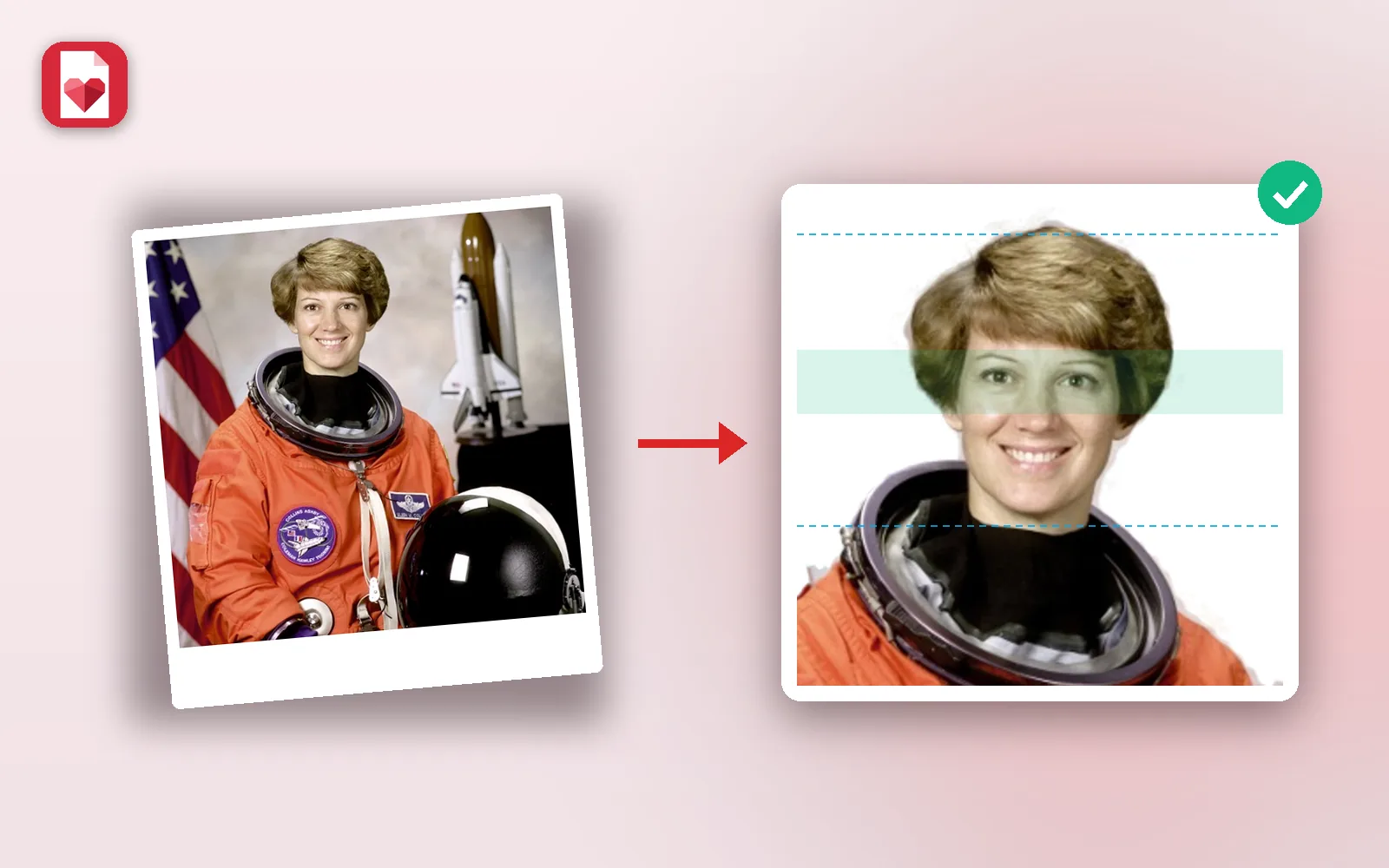
- Head size 50% to 69% of the height, measured from the bottom of the chin to the top of the hair.
- Eyes between 56% and 69% of the height from the bottom, as on the official photo template.
- Plain white or off-white background, no shadows, no pattern.
- Taken in the last 6 months, facing the camera, neutral expression, both eyes open.
- No glasses. Religious head coverings are allowed if your whole face is visible.
DV-2027 entry dates and what is new
The DV-2027 entry period has not opened yet. On October 14, 2026, a U.S. federal court ordered the Department of State to announce the entry period by October 29, 2026, open registration by November 1, 2026, and keep it open for at least 30 days. Check dvprogram.state.gov and travel.state.gov for the official dates; this guide is updated when they are announced.
- A $1 registration fee is paid online when you submit the entry. Entry used to be free; the fee applies since September 2025.
- A valid passport is now required. You enter your passport details and upload a JPEG scan of the passport's biographic page and signature page with the entry form. Narrow exemptions exist, for example for stateless people.
- The photo rules have not changed: 600 × 600, 240 KB, the same head size and background rules as before.
- One entry per person. Submitting more than one entry disqualifies you. Your spouse may enter separately and list you.
- Keep your confirmation number. It is the only way to check your result in the Entrant Status Check.
Make your DV photo in a minute
- 1
Take the photo
Stand in front of a plain light wall, face a window in daylight, and have someone take the photo at eye level from about 1 to 1.5 m. Keep your shoulders in the frame and leave space above your head.
- 2
Open the DV photo tool
Add the photo to DV Lottery Photo. Your face and the top of your hair are found, the photo is cropped to 600 × 600 with the head at the right size, and the background is made white.
- 3
Check the guides
The blue lines show your chin and the top of your hair, the green band shows where your eyes must be. Use Head size or the arrows if you want to adjust, and Clean edges to fix any leftover background around your hair.
- 4
Download and upload
Download the JPEG (under 240 KB) and upload it on the official entry form at dvprogram.state.gov.
Preparing the passport scan
The passport scan is a separate upload from your photo. Scan or photograph the biographic page (the page with your photo and details) and the signature page flat, in good light, with all four corners visible and no glare on the text.
- It must be a JPEG. If your scanner gives you a PDF, turn it into an image with PDF to JPG.
- Keep it light. A phone photo of a page can be several MB. Compress image reduces it while keeping the text sharp.
- Do not crop out details such as the passport number, dates or the machine-readable lines at the bottom.
How to take a good DV photo with your phone
- Light: face a window during the day. A ceiling light from above casts shadows under the eyes and the nose.
- Wall: a plain white or light grey wall. The tool makes it pure white, but a busy background is harder to clean around curly or long hair.
- Camera: use the rear camera, not the selfie camera, held by someone else at eye level. Selfies at arm's length distort the face.
- Pose: look straight into the camera, head level, mouth closed, both ears and both eyes visible if possible.
- Clothes: everyday clothes. Avoid white tops on a white background, and no uniforms.
- No filters: turn off beauty modes and portrait blur. Your appearance must not be changed.
Why DV photos get rejected
Photo problems are among the most common reasons entries are disqualified. Check yours against this list:
- Head too small (a full upper body photo) or too large (only the face).
- Grey, colored or patterned background, or shadows on the wall.
- Glasses, sunglasses, or hair covering the eyes.
- A photo that is not square, not 600 × 600, or over 240 KB.
- An old photo, or the same photo as a previous year's entry.
- A retouched or filtered photo, or one taken from too close.
If your photo is too heavy rather than too large in pixels, the DV tool already saves it under 240 KB. For other forms that ask for a size in KB, Compress image can target an exact size.
Enter only on the official site
The DV lottery entry is done only on dvprogram.state.gov, and the only charge to enter is the $1 registration fee paid there. Agencies that ask for more to enter you, or promise better chances, are not the official program and cannot improve your odds. Keep your confirmation number: it is the only way to check your result.
PDFkind is not affiliated with the U.S. Department of State. The photo tool runs in your browser and your photo is never uploaded to us.
Frequently asked questions
When does the DV lottery 2027 open?+
It has not opened yet. A court ordered the Department of State to announce the entry period by October 29, 2026 and open registration by November 1, 2026, for at least 30 days. The official dates are published on travel.state.gov and dvprogram.state.gov.
How much does it cost to enter the DV lottery?+
The registration fee is $1, paid online on dvprogram.state.gov when you submit. If you are selected, a separate visa application fee applies later. Making your photo with the free tool costs nothing.
Do I need a passport for the DV lottery?+
Yes, from DV-2027 a valid, unexpired passport is generally required. You enter its details and upload a JPEG scan of the biographic and signature pages, apart from narrow exemptions such as stateless people.
What size must a DV lottery photo be, in pixels and KB?+
A square JPEG of 600 × 600 pixels, 240 KB or less, in color. If you scan a printed photo, it must be 2 × 2 inches (51 × 51 mm) scanned at 300 pixels per inch.
Can I wear glasses in my DV photo?+
No. Glasses are not allowed in new U.S. visa and DV photos, except in rare medical cases with a signed doctor's statement. Take them off before the photo.
Can I take the DV photo with my phone?+
Yes. Use the rear camera in daylight in front of a light wall, held by someone else at eye level, then make it compliant with the DV photo tool.
Is it allowed to change the background to white?+
Your appearance must not be changed. Replacing only a light wall with plain white does not change your face, and the tool never retouches the face. If your wall is already white, you can switch whitening off.
Do my children need their own photos?+
Yes. Your spouse and every unmarried child under 21 listed on the entry need their own photo, even babies, and each one must meet the same rules.
Ready to try it?
Open DV Lottery Photo and follow the steps above. Your file stays on your device.
- Files never leave your device
- Free, no signup, no watermark
- Works on any browser