All the PDF tools you need, 100% free.
Edit, sign, merge, split, compress, convert, rotate, unlock and protect PDFs in a few clicks. Everything runs in your browser: no signup, no watermark, and your files never leave your device.
Most used
Every PDF tool, in one place
All 120 tools with descriptionsEdit & sign
Change text, sign, annotate, fill formsOrganize
Combine, split and rearrange pagesOptimize
Compress, clean up and compareCompress to a size:50 KB100 KB150 KB200 KB300 KB400 KB500 KB1 MB2 MB
Convert
Images, text and scans to PDF and backSecurity
Passwords and privacy100% free • No signup • No watermark
Free shouldn’t stop at the download button.
We got tired of “free” PDF tools that let you edit for ten minutes, then ask you to pay to download. So we built one that doesn’t: every tool is free, with no signup, no paywall and no watermark.
Because the work happens in your browser, there is nothing to upload and nothing for us to keep. That is what makes it private, and what lets us keep it free.
Read our story- Pay or sign up to download your edited fileTypical free PDF siteOftenPDFkindNever
- Watermark on the resultTypical free PDF siteSometimesPDFkindNever
- Files uploaded to a serverTypical free PDF siteOftenPDFkindNever. Everything runs on your device
- Daily limit on tasksTypical free PDF siteSometimesPDFkindNo limit
- Edited text loses its original fontTypical free PDF siteSometimesPDFkindNo. The original font is reused
- Arabic text breaks or isn’t supportedTypical free PDF siteSometimesPDFkindNo. 20+ fonts with right-to-left shaping
| What happens | Typical free PDF site | PDFkind |
|---|---|---|
| Pay or sign up to download your edited file | Often | Never |
| Watermark on the result | Sometimes | Never |
| Files uploaded to a server | Often | Never. Everything runs on your device |
| Daily limit on tasks | Sometimes | No limit |
| Edited text loses its original font | Sometimes | No. The original font is reused |
| Arabic text breaks or isn’t supported | Sometimes | No. 20+ fonts with right-to-left shaping |
Guides and how-tos
See all guides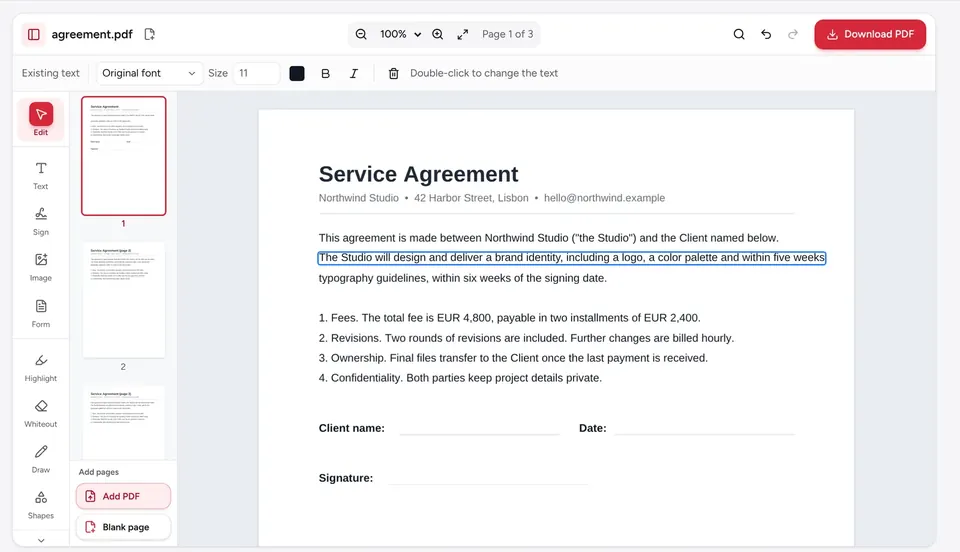 Edit PDF
How to edit a PDF
Edit a PDF in your browser: change existing text, add new text, images and links, then download. Free, no signup, no watermark, and files stay on your device.
 Sign PDF
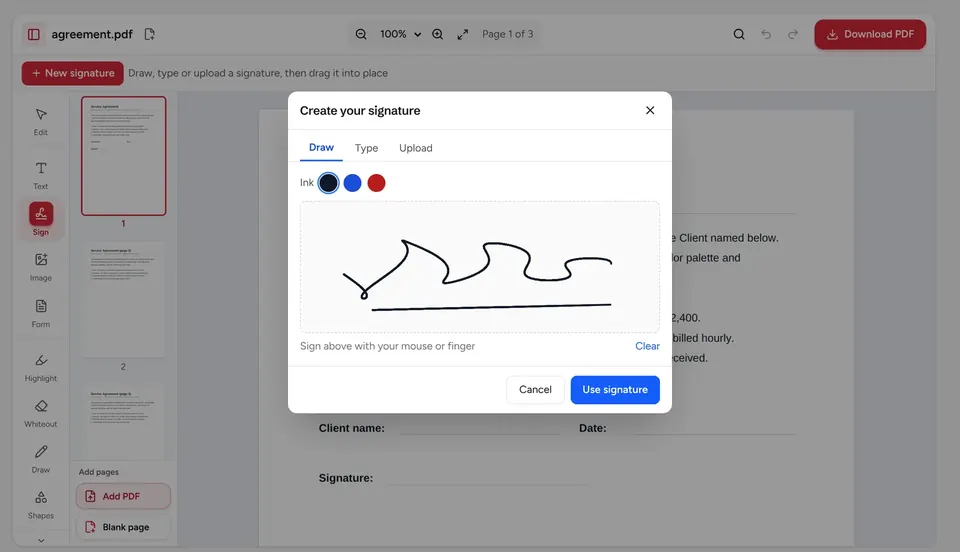
How to sign a PDF
Sign a PDF by drawing, typing or uploading your signature, on iPhone, Android or a computer. Free, no account, no watermark; the file stays on your device.
 Compress PDF
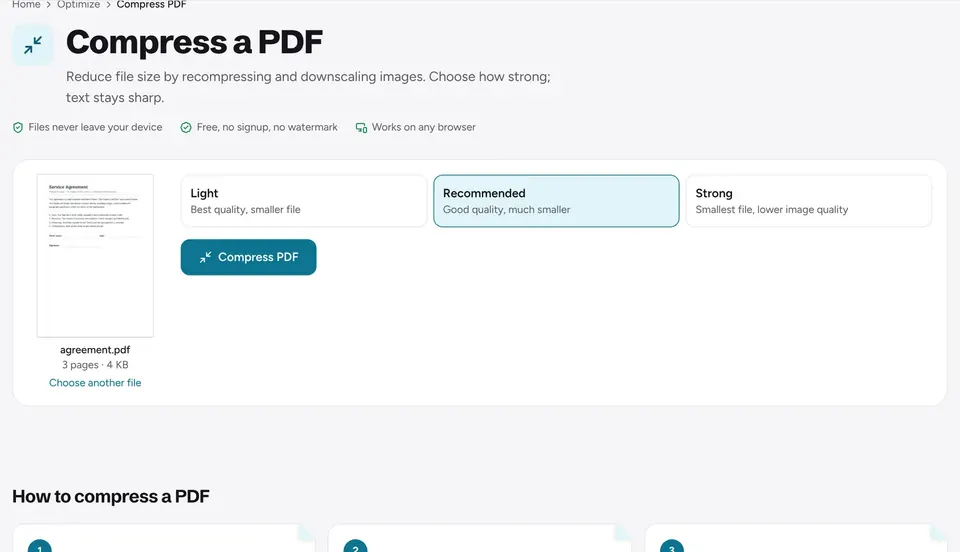
How to reduce PDF file size
Make a PDF smaller to fit Gmail, Outlook or upload portal limits. Pick a compression level, check the new size and download. Free, processed on your device.
Frequently asked questions
Is PDFkind really free?+
Yes. Every tool is free with no signup, no watermark and no paywall at download. The site is funded by a few clearly marked ads.
Are my files uploaded?+
No. PDFs and images are processed by your browser on your own device. They are never sent to us, which also makes the tools fast with large files.
Can I edit the text that is already in a PDF?+
Yes. Open the editor and double-click a line or a whole paragraph, even vertical or slanted text. The original font, size and color are kept whenever possible, and the lines reflow as you type.
Does it work on a phone?+
Yes. Every tool works in any modern browser on Windows, macOS, Linux, Android and iPhone, and the scanner uses your phone’s camera.
What happens if I close the tab by mistake?+
The editor autosaves your work on your device. Reopen it and click “Continue editing”.
Which languages are supported?+
Text in any language can be added or edited, including Arabic, with correct right-to-left shaping. OCR reads English, French, Arabic, Spanish, German, Italian, Portuguese, Dutch and Turkish, and the site itself is available in 8 languages.
How does PDFkind make money if everything is free?+
Through a few ads on the pages around the tools. Ads never cover your document, never block a download and never get access to your files.
Is there a file size or page limit?+
There is no daily limit, page cap or file size cap. Since the work happens on your device, very large files depend only on how much memory your computer or phone has.
Do I need to install anything?+
No. Every tool runs in your browser with nothing to download, no extension and no account. It works in Chrome, Safari, Edge and Firefox.
Will my PDF get a watermark?+
Never. Files you edit, merge, compress or convert come back clean, with no watermark, logo or added page.
Can I sign a PDF with my own signature?+
Yes. Draw it with your mouse or finger, type it in a handwriting font or upload a photo of it, then place it anywhere on the page.
Can I edit a scanned PDF?+
Yes. Open it in the editor and choose “Make scanned text editable”: the text is recognized, and you can then change it like normal text. To only make a scan searchable and copyable, use OCR PDF.
Can I convert Word, Excel or PowerPoint files to PDF?+
Word (.docx) and Excel (.xlsx, .xls, .ods, .csv) files convert to PDF in your browser, as do EPUB e-books, HTML, Markdown, text and images. PDFs also convert to Word, Excel and PowerPoint. PowerPoint to PDF is not available yet.
Does it work offline?+
Once a tool has loaded, your files are processed on your device without being sent anywhere. OCR downloads its language data the first time you use it.